Hidden in Plain Sight: Surfacing Sparrk's Host Booking Page

Sports-rental marketplace · Philippines | Sparrk | UX audit + redesign

Summary
A booking page hosts fight on their busiest days
Sparrk is a sports-rental marketplace in the Philippines — it connects players with the courts, venues, and gear that hosts list. This case study is about the host side: the booking page a venue runs all day, every day. I was brought in to audit it and redesign the parts that fought the host instead of helping them.
The audit kept returning the same finding: the controls a host touches most were either buried or missing. So the redesign followed one rule everywhere — frequency first: surface what's buried, add what's missing.
Product
Web · Host booking management for a sports-rental marketplace
Timeline
2025 · audit + redesign
My Role
UX/UI designer, brought in to audit and redesign. I mapped the host's busy-day frequency, ranked the friction, then added the essentials that were missing and re-ranked the rest around what hosts reach for most.
Skills
UX Audit, Information Architecture, Task-flow Mapping, Heuristic Evaluation
Impact
Turned a buried, scroll-heavy host page into one you run, not read — added on-the-spot booking, search and a status filter, and surfaced the controls that were buried. Redesign delivered.
Roles & Research
Two people touch the host page, but a focused redesign needs a protagonist — so this case study zooms into the one running the desk at peak: the front-desk host.


Two roles mapped — one protagonist. The front-desk host, taking bookings and walk-ins while a customer waits, is who this redesign solves for. Here's their day:

My research was the host's day, not a survey. I followed how a front-desk person moves through a busy afternoon — where they tap, where they scroll, where they get stuck — and let that frequency map drive every layout decision.
The Problem
"Half of it was buried — the other half wasn't there."
The page had the bones of a booking tool, but it failed the host two ways. The controls they reached for every few minutes — filtering today's bookings, opening a reservation — were buried behind menus, below the fold, or lost in one long detail screen. And some essentials simply weren't there: no way to add a walk-in on the spot, no search, no way to filter by status.
A control you can't reach — or that doesn't exist — is the same thing to a busy host: a wait.


What the host needed was either buried — or missing entirely.
How I Worked
Frequency-first, run against the host's real day
I don't audit screens in the abstract — I audit them against the busiest version of the job. On Sparrk it looked like this:
The Wrong Assumption
"More visible means more powerful."
The original page leaned on visibility — lots of fields and actions laid out flat, all competing for attention. It looked capable. But for someone running a busy desk, "all visible, all equal" meant "nothing prioritised": the eye had to hunt every single time — and the controls that would have helped most often weren't even there.
Power isn't how much you can see — it's how fast you can act.
A page that shows everything asks the eye to hunt every single time.
How I Decided
Optimising for the busy minute, not the demo
I weighed three ways to fix a page that showed too much, too flat.
Approach | Fast on a busy day | Keeps power | Risk |
|---|---|---|---|
Reorganise menus | No | Yes | High |
Hide rare controls | Partly | No | Medium |
Re-rank by frequency | Yes | Yes | Low |
I designed for the busy minute, not the feature list.

The Redesign
Wireframes & Structure
Before any visual, I restructured the three problem areas in low fidelity — proving the new information architecture worked before styling a single screen.


The redesign followed one rule: the control a host reaches for most should be the easiest to reach — surfaced if it was buried, added if it wasn't there at all.
Frequency-first — add what's missing, surface what's buried
I ranked everything by how often a host reaches for it, then fixed the page two ways: I added the essentials that weren't there, and surfaced the ones that were buried.
Added on-the-spot booking
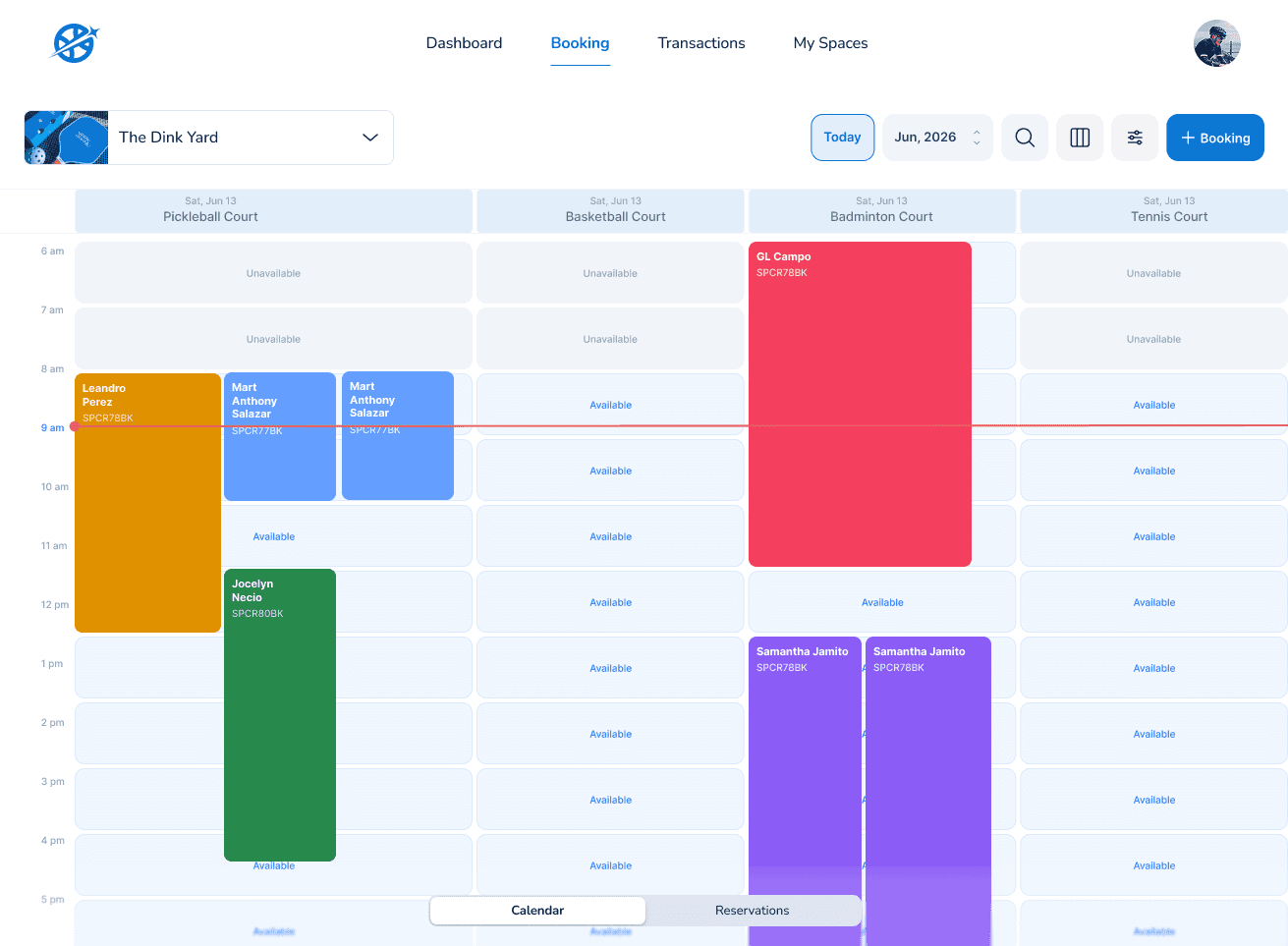
The calendar was view-only — a host couldn't take a walk-in. I added a primary + Booking action, launchable straight from the list.
Added search and a status filter
There was no way to look up a booking or filter by state. I added search to the top bar and a status filter — upcoming, completed, cancelled.
Surfaced the buried filters
The filters lived in a separate pop-up. I pulled them onto the screen and ranked them by how often a host uses them.
Sectioned the endless detail
The reservation detail was one long scroll. I broke it into scannable sections — guest, schedule, payment, notes — so a host jumps straight to what they need.
A busy host shouldn't have to hunt for a control — or wish one existed.


I added what was missing and surfaced what was buried — all ranked by how often a host reaches for it.
Built for the Worst Moment
Designed for the front desk at peak
A host page is judged at 5pm on a Saturday with a queue, not in a calm demo. So I designed the edge cases first.
Walk-in while filtered — the walk-in action stays reachable no matter what filter is applied.
Double-booking guardrail — conflicting slots surface before confirm, not after.
Half-entered booking — a partial walk-in is recoverable, never lost on a mistap.
Empty vs loading — a host always knows whether it's "no bookings yet" or "still loading."
I treated the messy, mid-rush moments as first-class — because that's when this page actually earns its keep.


Impact & Learnings
Outcomes
Busy-day tasks in seconds — filter, walk-in, and open-booking each dropped to a tap or two.
Walk-ins unblocked — the action hosts asked for most is now front-and-centre.
Audit → roadmap — the ranked friction list became the redesign backlog.
Learnings
Audit against the busiest version of the job, not the average one.
"Everything visible" is a design decision, not a neutral default — flatness has a cost.
Frequency is the cheapest prioritisation signal you have. Use it.
When you rank a screen by what people do most, the busy minute stops being a fight.
The fastest host action is the one already under their thumb.
What's Next
Extend the pattern — roll frequency-first to the owner dashboard and reporting.
More quick-actions — reschedule and refund as one-tap host actions.
Measure it — instrument task times to confirm the speed-ups with real data.
Designing for the busy minute — one host action at a time.
Speed isn't a feature you add — it's an order you choose.